TNREGINET EC View – Encumbrance Certificate & Guideline Value
TNREGINET stands for Tamil Nadu Registration Department’s Integrated Online Portal. The Tamil Nadu government built this platform to bring all property and civil registration services under one digital roof. It eliminates the need to visit a Sub-Registrar Office (SRO) for most tasks.
The Inspector General of Registration (IGR), Tamil Nadu manages this portal. Tata Consultancy Services (TCS) developed it as part of Tamil Nadu’s e-governance push. Today, it serves crores of citizens, lawyers, builders, banks, and NRIs across the state.
| Portal Name | TNREGINET – Tamil Nadu Registration Department Portal |
| Official URL | tnreginet.gov.in/portal/ |
| Managed By | Inspector General of Registration (IGR), Tamil Nadu |
| Developed By | Tata Consultancy Services (TCS) |
| State | Tamil Nadu, India |
| Language | English & Tamil (தமிழ்) |
| Services | Property Registration, EC, Guideline Value, Stamp Duty, Certificates |
| Access | Desktop & Mobile Browser |
| 2026 Update | Aadhaar-based OTP verification, paperless registration, e-document delivery |
TNREGINET vs. Old Manual Registration Process
| Task | Old Process | TNREGINET 2026 |
|---|---|---|
| Property Registration | Multiple office visits, weeks of wait | Online + 1 SRO visit |
| EC Download | Pay fees, wait 3-7 days | Free, instant online |
| Guideline Value | Visit taluk office | Check online in 2 min |
| Stamp Duty Payment | Buy physical stamp paper | Pay online securely |
| SRO Appointment | Stand in queue physically | Book slot online |
| Marriage Certificate | Office application, weeks of delay | Apply & track online |
All Services Offered by TNREGINET Portal (2026)
TNREGINET is not just a property portal. It covers a wide range of government registration services in one place. Here is every service available on the portal today.
🏠
Property Registration
Register sale deeds, gift deeds, mortgage deeds, and settlement deeds online.
📄
Encumbrance Certificate (EC)
View and download EC for any property in Tamil Nadu, free of cost.
💰
Guideline Value Search
Check government-approved minimum property value before buying or selling.
🧾
Stamp Duty & Payment
Calculate and pay stamp duty online without visiting a stamp vendor.
🔍
Document Search & Download
Search and download certified copies of previously registered documents.
💍
Marriage, Birth & Death
Register and download marriage, birth, and death certificates digitally.
🏗️
Building Value Calculation
Estimate construction value based on PWD rates for registration purposes.
📍
SRO Jurisdiction Finder
Find which Sub-Registrar Office handles your property’s location
🏢
Firm, Society & Chit Fund Registration
Register business entities, societies, and chit funds through the portal.
🌾
Patta Chitta Records
Access land ownership records linked to TNREGINET property data.
🔗
e-District Integration
Access integrated services across Tamil Nadu’s e-governance platforms.
📅
SRO Appointment Booking
Book and manage your Sub-Registrar appointment slot online.
How to Create Account & Login on TNREGINET (Step-by-Step)
You need a TNREGINET account to access services like property registration, EC download, and appointment booking. Creating one takes less than 10 minutes. Here is exactly how to do it.
ℹ️ Before You Start: Keep your Aadhaar number, mobile number, and email ID ready. Your mobile number must be linked to Aadhaar for OTP verification.
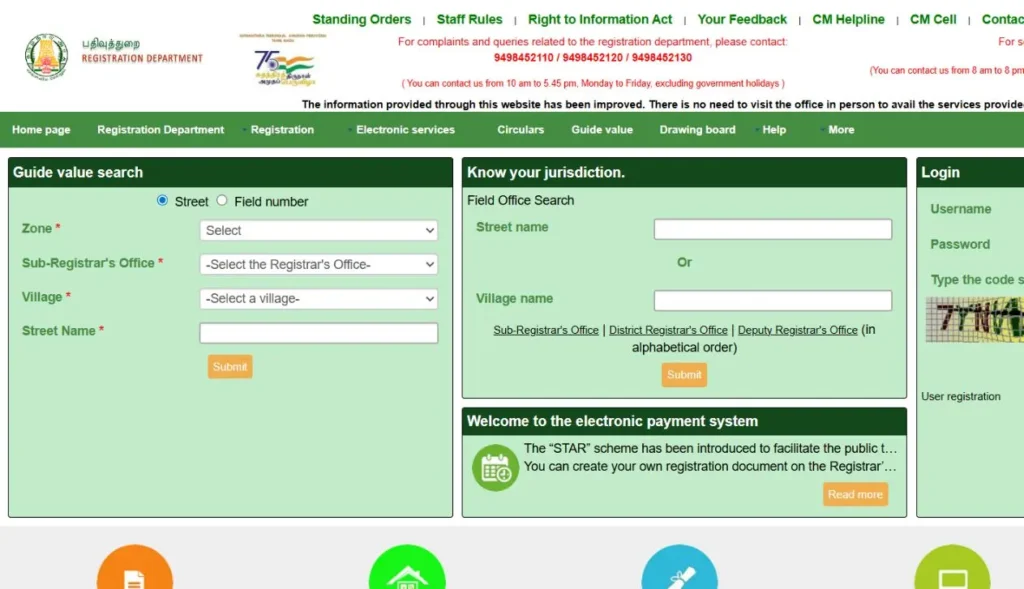
1. Visit the Official Portal
Go to tnreginet.gov.in/portal/ in any browser. Always use the official URL to avoid fake lookalike websites.
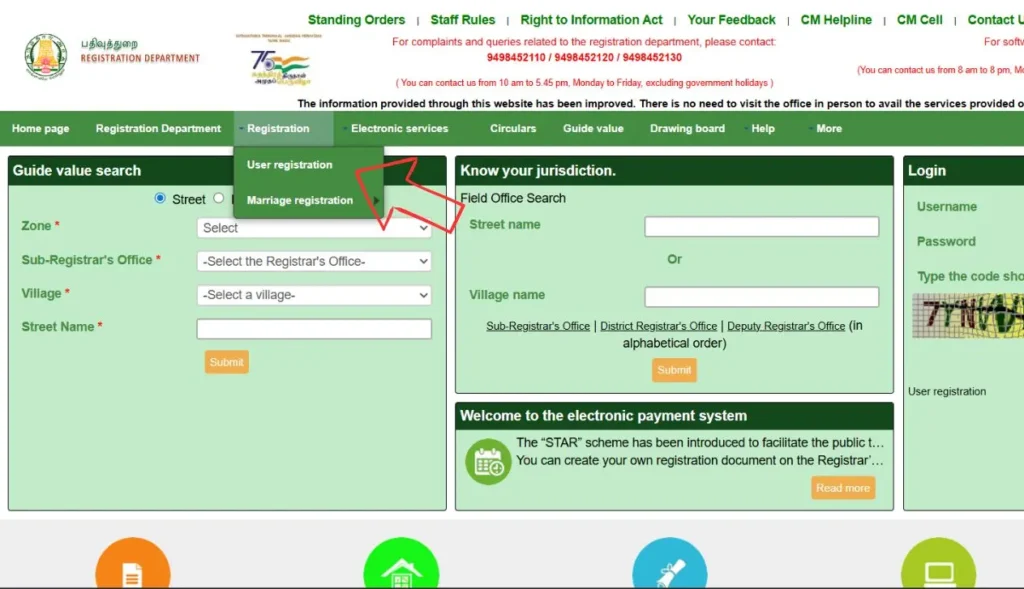
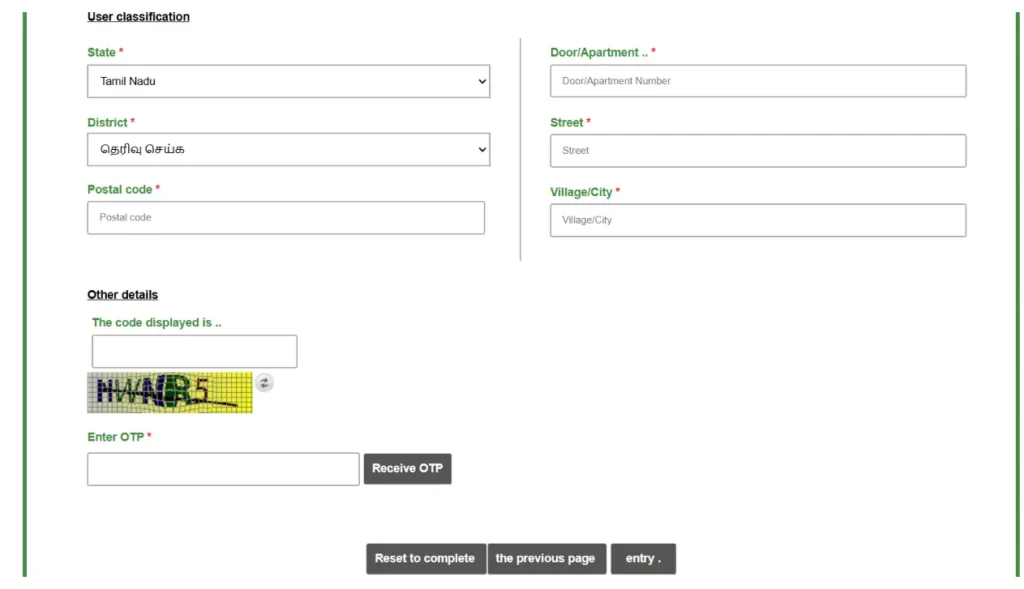
2. Click on Registration → User Registration
On the top menu, click on Registration and select User Registration from the dropdown.
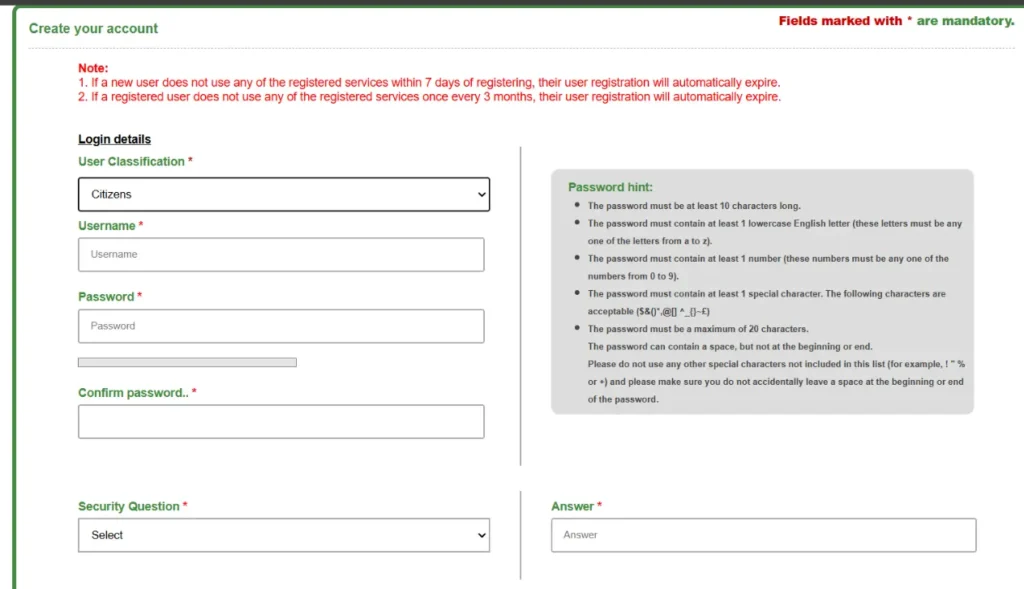
3. Select Your User Type
Choose from Citizen, Document Writer, Builder, Advocate, or Bank. Most individuals select Citizen.
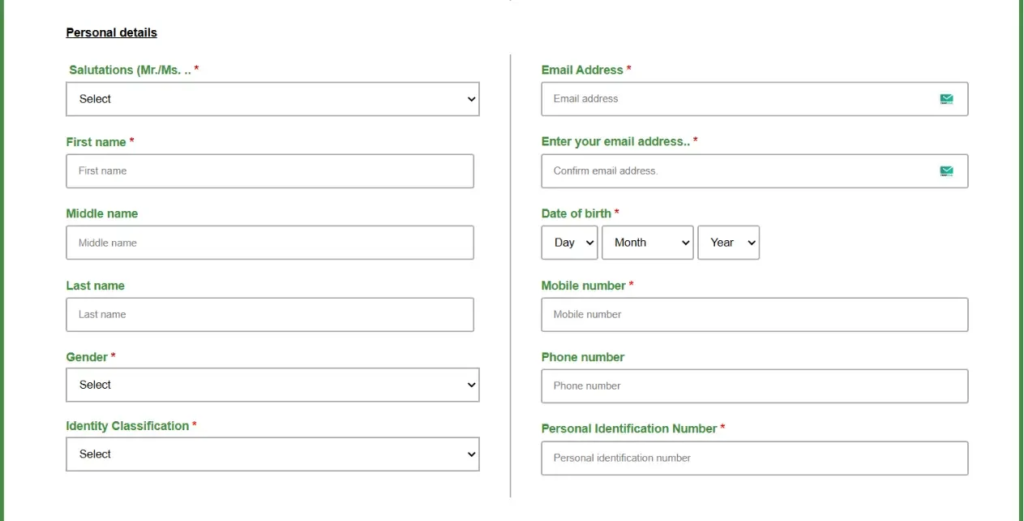
4. Fill in Your Personal Details
Enter your full name, username, password, email, mobile number, ID proof type, and security question. Double-check your name – it must match your ID proof exactly.
5. Verify Your Mobile Number (OTP)
You will receive an OTP on your registered mobile number. Enter it within 60 seconds to verify.
6. Set a Strong Password
Use a combination of uppercase, lowercase, numbers, and symbols. Minimum 8 characters.
7. Login and Access Your Dashboard
After registration, log in with your new credentials. You now have access to all TNREGINET services.
⚠️ Important Notes
- Log in at least once within 7 days of registration, otherwise your account gets deactivated.
- Log in at least once every 3 months to keep your account active.
- Never share your login credentials with anyone, including document writers.
How to Reset Your Password
If you forget your password, click Forgot Password on the login page. Enter your registered email or mobile number. You will receive a reset link or OTP. Create a new password and log in again.
Is TNREGINET Login Safe?
Yes. The portal uses HTTPS encryption and Aadhaar-linked OTP verification. Never log in from public Wi-Fi or shared computers. Always log out after your session to keep your account secure.
How to Register a Property on TNREGINET
Property registration makes your ownership legally valid. Without registration, even a paid-for property holds zero legal weight in court. TNREGINET simplifies this process, but you still need one in-person visit to the SRO for biometric verification. Here is the complete process.
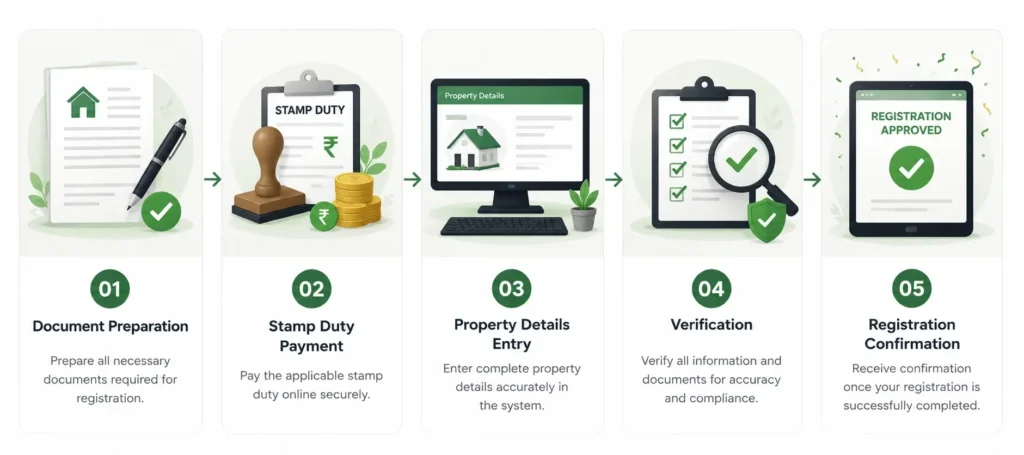
Documents Required for Property Registration
| Document | Purpose | Format |
|---|---|---|
| Sale Agreement / Deed | Proof of transaction terms | Original + scanned copy |
| Aadhaar Card (Buyer & Seller) | Identity verification | Self-attested copy |
| PAN Card | Tax compliance (above ₹5 lakh) | Copy |
| Encumbrance Certificate | Property history & liabilities | Downloaded from TNREGINET |
| Patta / Chitta | Land ownership record | Latest copy from Tahsildar |
| Property Tax Receipt | Proof of tax payment | Latest receipt |
| NOC from Bank | If existing loan on property | Original |
| Passport Size Photos | For both buyer and seller | 2 each |
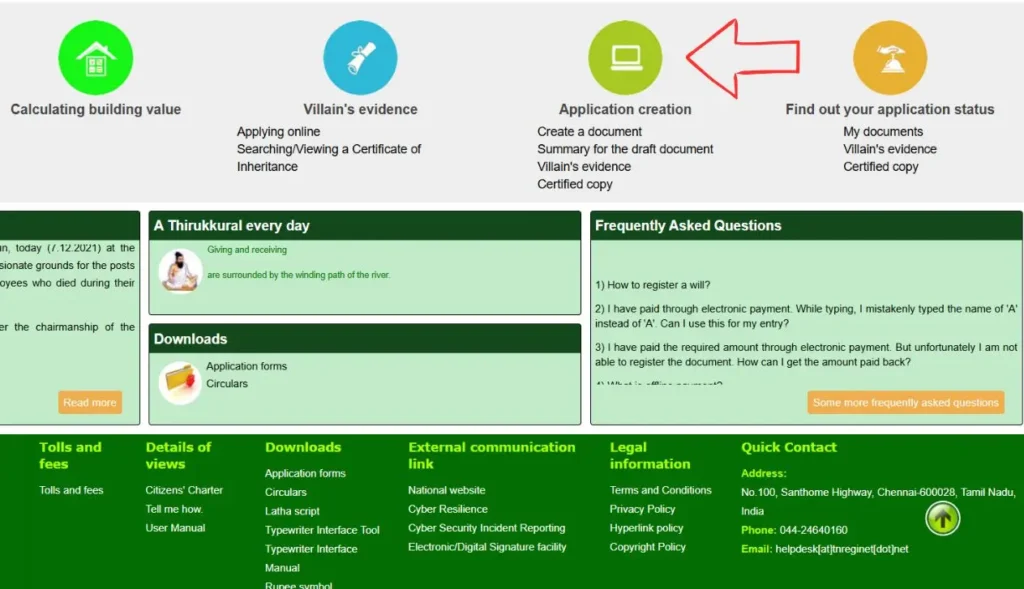
- Login & Create a New Application
- Log in to your TNREGINET account. Go to Registration of Document → Create Document.
- Select Document Type
- Choose from Sale Deed, Gift Deed, Mortgage Deed, Settlement Deed, or others based on your transaction type.
- Enter Property & Party Details
- Add the property’s survey number, location, total extent, and the buyer and seller details. Match names exactly as they appear on Aadhaar.
- Upload Required Documents
- Upload scanned copies of all required documents in the specified format (PDF or JPG, under 2 MB each).
- Calculate & Pay Stamp Duty Online
- Use the portal’s built-in stamp duty calculator. Pay online via net banking, UPI, or debit card. Save the payment receipt.
- Schedule Your SRO Appointment
- Book an available date and time at your local Sub-Registrar Office. You will receive a confirmation on your registered mobile.
Visit SRO for Final Verification & Biometric
Bring all original documents and both parties (buyer and seller). The SRO officer captures fingerprints and photographs. The registered document is issued, often available digitally the same day.
Common Mistakes to Avoid During Property Registration
- Name mismatch between Aadhaar and property deed, causes immediate rejection
- Paying stamp duty based on market value instead of guideline value (whichever is higher applies)
- Not verifying the EC before registration, outstanding loans can block the transfer
- Forgetting to bring original documents on SRO appointment day
- Using an outdated browser that causes portal loading errors
- Ignoring the reference number after application submission, you need it to track status
How to View & Download Encumbrance Certificate (EC)
An Encumbrance Certificate, or EC, shows the complete ownership and transaction history of a property. Banks demand it before approving a home loan. Buyers need it before finalizing a deal. Courts use it in property disputes. It is one of the most important documents in any Tamil Nadu property transaction.
What is Form 15 and Form 16 in EC?
| Form Type | Meaning | When You Get It |
|---|---|---|
| Form 15 | Property has registered transactions, sales, mortgages, or legal charges in the searched period | When EC shows encumbrances |
| Form 16 | Property has no registered transactions in the searched period, a clean certificate | When EC shows nil encumbrance |
💡 Pro Tip: Always check EC for at least the last 15–30 years. Short-period EC can miss older mortgages or legal disputes that still affect the property.
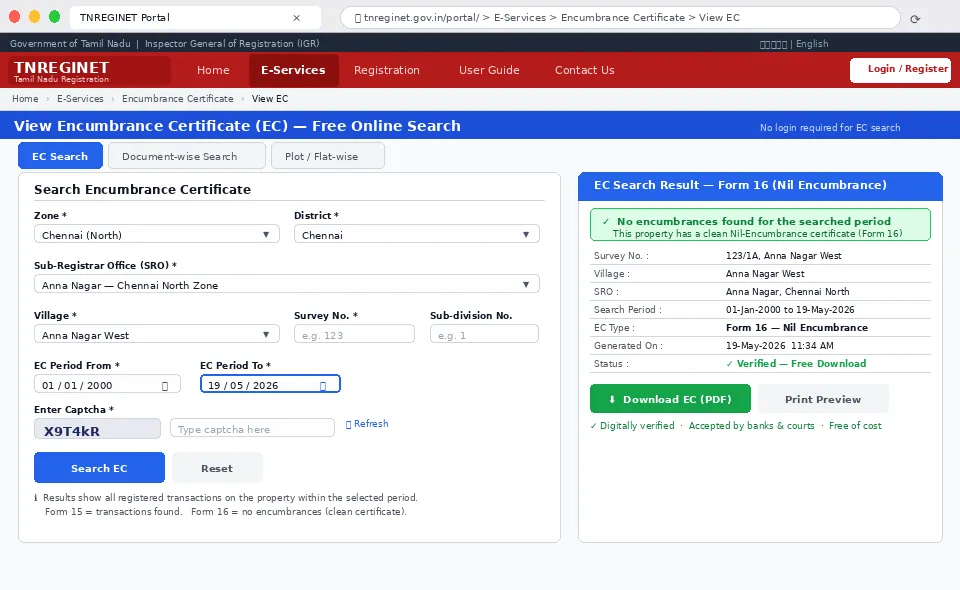
Step-by-Step: How to View EC Online (Free)
1. Go to E-Services → Encumbrance Certificate → View EC
- Log in to tnreginet.gov.in/portal/ and navigate through the E-Services menu.
2. Choose Your Search Method
- Select one: EC Search (by survey number), Document-wise (by deed number), or Plot/Flat-wise.
3. Enter Property Details
- For EC Search: Enter Zone, District, Sub-Registrar Office, Village, Survey Number, and Subdivision Number. Set your start and end dates.
4. Enter Captcha and Click Search
- Type the captcha code carefully (it is case-sensitive) and click Search.
5. View and Download the EC as PDF
The EC displays on screen. Click Download to save it as a PDF. This is completely free of cost.
How to Read Your EC Document
An EC lists every registered transaction on the property within your chosen period. Each entry shows the deed type, document number, date, parties involved, and the nature of the transaction (sale, mortgage, release, etc.). If the list is empty, you get a Form 16, meaning no encumbrances exist. If transactions appear, study each one carefully to ensure all past loans show as “released” before you buy.
Is Online EC Valid for Legal Purposes?
Yes. The digitally downloaded EC from TNREGINET is an officially recognized document accepted by courts, banks, and government offices across Tamil Nadu. Banks accept it for home loan processing. However, some banks may ask for a certified copy (applied through the portal at a small fee) for very large loan amounts.
EC for Home Loans – What Banks Look For
Banks typically ask for EC covering the last 13 to 30 years. They check that no active mortgage exists on the property, no court attachment or legal notice appears, and all previous loans show as “discharged.” A clean Form 16 for the requested period gives banks confidence to approve your loan faster.
How to Check Guideline Value on TNREGINET
The guideline value is the minimum price the Tamil Nadu government sets for a property in any given area. You cannot register a property below this value. The guideline value directly determines how much stamp duty you pay, so checking it before any transaction saves you from costly surprises.
Guideline Value vs. Market Value – Key Difference
| Factor | Guideline Value | Market Value |
|---|---|---|
| Set By | Tamil Nadu Government (IGR) | Buyers, sellers, market forces |
| Purpose | Stamp duty calculation base | Actual transaction price |
| Changes | Government revises periodically | Changes daily with demand |
| Stamp Duty Basis | Used when higher than market value | Used when higher than guideline value |
| Where to Check | TNREGINET portal | Local brokers, portals like MagicBricks |
⚠️ Key Rule: Stamp duty is always calculated on the higher of guideline value or market value. Never underreport your property’s market value to save stamp duty – it is illegal and can lead to penalties.
Step-by-Step: How to Check Guideline Value
Visit tnreginet.gov.in/portal/
No login required for basic guideline value search.
Click on “Guideline Value” under E-Services
Find it in the main navigation or E-Services dropdown.
Select Zone, District & Sub-Registrar Office
Choose the relevant zone (Chennai, Madurai, etc.), then district, then the specific SRO.
Enter Village, Street & Survey Number
Be as specific as possible. The portal shows guideline values for residential, commercial, and agricultural land separately.
View Guideline Value Results
The portal displays the value per square foot or per cent, depending on the property type and location.
Stamp Duty & Registration Charges in Tamil Nadu
Stamp duty is the tax you pay to the Tamil Nadu government when you register a property. It is not optional – unpaid or underpaid stamp duty means your property registration is invalid. TNREGINET lets you calculate and pay stamp duty online, saving you a trip to the stamp vendor.
Current Stamp Duty Rates – Tamil Nadu 2026
7% Stamp Duty (Sale Deed) | 4% Registration Fee
11% Total Buyer Cost | 1% Gift Deed (Blood Relatives)
| Document Type | Stamp Duty | Registration Fee | Basis |
|---|---|---|---|
| Sale Deed | 7% | 4% | Market/Guideline Value (higher) |
| Gift Deed (Blood Relatives) | 1% | 1% | Property Value |
| Gift Deed (Others) | 7% | 4% | Property Value |
| Settlement Deed (Blood Relatives) | 1% | 1% | Property Value |
| Mortgage Deed | 1% | 1% | Loan Amount |
| Lease Deed (above 1 year) | 1% | 1% | Annual Rent |
| Partition Deed | Varies | Varies | Share Value |
💡 Example Calculation: For a property worth ₹50 lakh – Stamp duty = ₹3.5 lakh (7%) + Registration fee = ₹2 lakh (4%) = Total ₹5.5 lakh. Budget for this before you finalize your property deal.
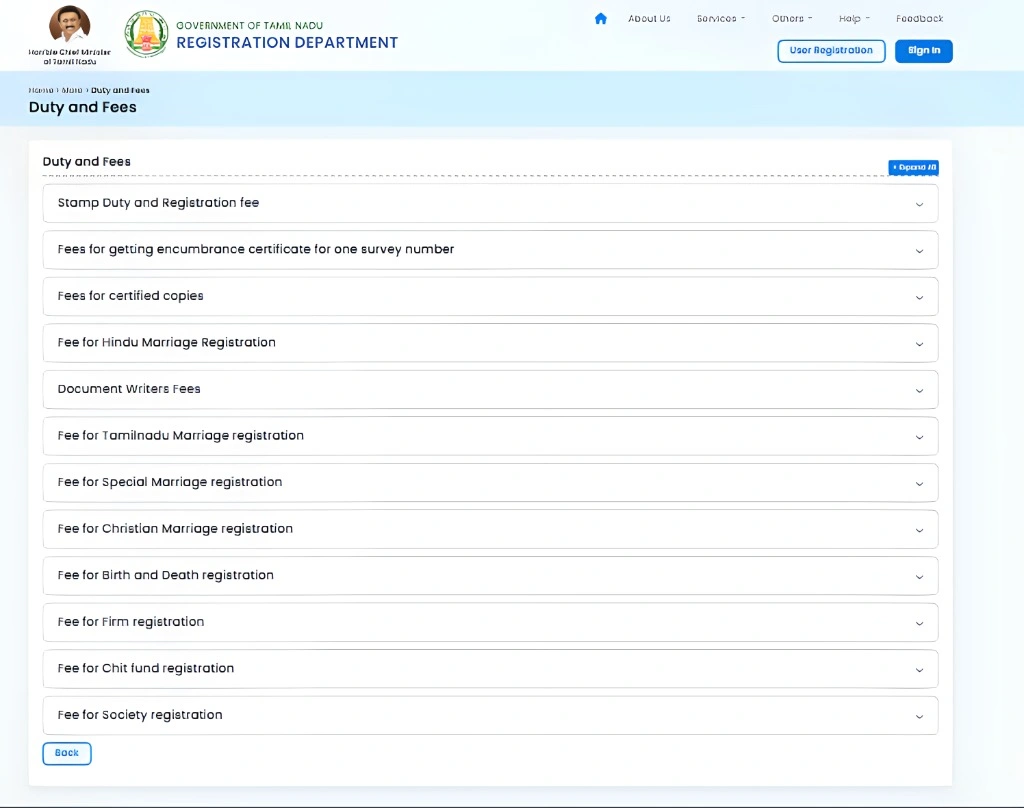
Stamp Duty Exemptions & Concessions
- Women Buyers: 1% discount on registration charges for properties up to ₹10 lakh (2025 rule)
- Differently-Abled Persons: 50% rebate on stamp duty, huge relief for eligible buyers
- Agricultural Land Transfers: Same 7% rate applies, but calculated on lower agricultural guideline values
- Family Transfers (Gift/Settlement to blood relatives): Reduced rate of 1% stamp duty + 1% registration fee
How to Pay Stamp Duty Online on TNREGINET
- 1. Log in & Go to Duty and Fees
- Navigate to the Duty and Fees section from your dashboard.
- 2. Select Document Type & Enter Value
- Choose the type of deed and enter the property value. The calculator shows the exact duty amount.
- 3. Pay Online
- Pay via net banking, UPI, debit card, or credit card. Download and save your payment receipt immediately.
Document Search & Download on TNREGINET
Need a copy of a registered deed from years ago? TNREGINET lets you search and download certified copies of any registered document in Tamil Nadu, without visiting the SRO.
What Documents Can You Search?
- Sale deeds, gift deeds, settlement deeds registered at any SRO in Tamil Nadu
- Mortgage and release deeds
- Power of attorney documents
- Partition deeds and agreement copies
- Public utility application forms for various services
How to Search & Download a Registered Document
Log in and go to E-Services → Document Search
Find the Document Search option under E-Services in the main menu.
Choose Search Method
Search by Document Number + Year + SRO, or by Party Name, or by Survey Number.
Enter Details & Search
Fill in the required fields and click Search. The results show matching documents.
Apply for Certified Copy (If Needed)
For certified copies, click Apply. Pay the applicable fee and download once approved.
🔐 Verify Document Authenticity: Every downloaded document from TNREGIINET carries a digital verification code. You can use this code on the portal to confirm the document is genuine, never accept unverified copies from third parties.
Marriage, Birth & Death Registration on TNREGINET
TNREGINET handles civil registration too. You do not need to run between municipalities and SRO offices for marriage, birth, or death certificates anymore. The portal connects these services into one window.

Marriage Registration – Step by Step
- 1. Log in & Click Create Application
- Go to the registration section and select Create Application.
- 2. Choose Certificate Type – Marriage
- Select Marriage Registration from the available certificate types.
- 3. Fill Details Accurately
- Enter bride and groom’s full names (exactly as per Aadhaar), date of marriage, place, and witness details. Any mismatch causes rejection.
- 4. Upload Supporting Documents
- Upload age proof, address proof, marriage photos, and witness ID cards.
- 5. Submit & Track Application
- Note the application reference number. Track your status under the Application Tracking section.
Birth & Death Certificate – Quick Process
For birth or death certificates, follow the same application path but choose Birth Registration or Death Registration as the certificate type. Upload the hospital discharge summary (for birth) or death report (for death), along with family ID proof. Track your application online and download the certificate once issued.
How to Find Your Jurisdiction / SRO Office on TNREGINET
Every property in Tamil Nadu falls under a specific Sub-Registrar Office (SRO). You must register your property at the correct SRO, a wrong SRO means rejection. TNREGINET’s Jurisdiction Finder removes all the guesswork.
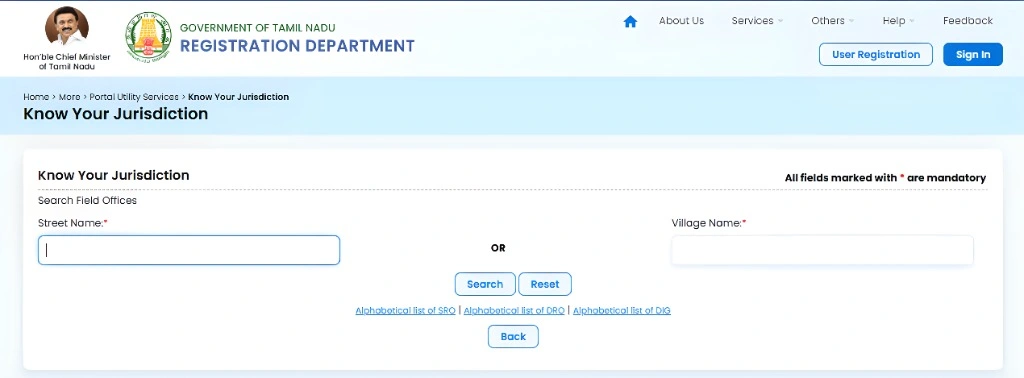
Step-by-Step: Use the Jurisdiction Finder
- 1. Go to E-Services → Know Your Jurisdiction
- No login required. Find the Jurisdiction Finder under E-Services.
- 2. Select District & Enter Street / Village Name
- Choose your district from the dropdown and type your street or village name.
- 3. View Your SRO Details
- The portal shows the SRO name, address, and contact number for your area.
Major SRO Offices in Tamil Nadu – District-Wise Overview
| District | Key SRO Areas | Registration Zone |
|---|---|---|
| Chennai | Anna Nagar, T. Nagar, Adyar, Ambattur, Perambur | Chennai North & South |
| Coimbatore | RS Puram, Peelamedu, Singanallur | Coimbatore |
| Madurai | Anna Nagar, KK Nagar, Thiruparankundram | Madurai |
| Salem | Salem City, Attur, Mettur | Salem |
| Tiruchirappalli | Trichy City, Srirangam, Thillai Nagar | Tiruchirapalli |
| Tirunelveli | Tirunelveli Town, Palayamkottai | Tirunelveli |
| Erode | Erode City, Gobichettipalayam | Coimbatore |
| Vellore | Vellore City, Ranipet | Vellore |
📋 What to Carry to Your SRO Visit: Original documents, photo ID for all parties, payment receipt for stamp duty, and your TNREGINET appointment confirmation SMS or printout.
Building Value Calculation on TNREGINET
When you register a building (not just land), the Tamil Nadu government calculates the building’s construction value based on PWD (Public Works Department) rates. This value adds to the land’s guideline value to determine your total stamp duty.
How to Calculate Building Value
- 1. Go to Building Value under E-Services
- Find the Building Value section in the E-Services menu, no login required.
- 2. Enter Construction Details
- Input building type (RCC, brick, etc.), number of floors, construction year, and total built-up area in square feet.
- 3. View Calculated Building Value
- The portal shows the PWD-rate based building value. Add this to your land’s guideline value for total stamp duty calculation.
Older buildings get a depreciation allowance. A building that is 20 years old will have a lower PWD value than a new construction. This can sometimes reduce your total registration cost significantly.
Patta Chitta & Land Records via TNREGINET
Patta is your legal ownership document for land issued by the Tamil Nadu Revenue Department. Without a valid Patta in your name, your property ownership remains incomplete – even after registration at the SRO.
What is Patta, Chitta, and Adangal?
| Document | What It Shows | Issued By |
|---|---|---|
| Patta | Legal ownership of land – owner name, survey number, extent | Tahsildar Office |
| Chitta | Land classification (wet/dry), owner, and cultivator details | Village Administrative Officer |
| Adangal | Land use details – crops grown, irrigation source | Village Administrative Officer |
⚠️ Important: After you register a property at the SRO, apply for Patta mutation in your name at the Tahsildar office or through Tamil Nadu’s e-Sevai portal within 90 days. TNREGINET registration and Patta transfer are separate processes – both are essential.
You can access basic Patta and Chitta records through eservices.tn.gov.in (Tamil Nadu e-Services portal), which links land records with TNREEGINET property registration data. Always verify that the survey number in your TNREGINEET EC matches the survey number in your Patta before signing any sale deed.
TNREGINET for NRIs – Complete Guide
Thousands of Tamil Nadu-origin NRIs own property back home but struggle to manage it remotely. Its makes most tasks possible from abroad, but a few steps still need careful planning.
Can NRIs Register Property in Tamil Nadu Online?
Yes and no. NRIs can complete most of the paperwork, document drafting, stamp duty payment, and application on TNREGINET from anywhere in the world. However, the final SRO visit for biometric verification requires physical presence – either by the NRI personally or through a valid Power of Attorney (POA) holder.
Power of Attorney (POA) – The NRI’s Best Tool
1. Draft a POA Document
Appoint a trusted family member or lawyer in Tamil Nadu as your POA holder. The POA must specifically mention property registration powers.
2. Attest at Indian Embassy or Consulate
Visit the nearest Indian Embassy or Consulate in your country. Get the POA attested. This is mandatory for legal validity in India.
3. Send POA to India & Register It
Courier the attested POA to your representative in Tamil Nadu. They must register it at the local SRO before using it.
4. POA Holder Completes TNREGINET Process
Your representative can now manage property registration, EC downloads, and other tasks on your behalf.
How NRIs Can Check EC & Guideline Value Remotely
EC viewing and guideline value checks on TNREGINET require no physical presence. Log in to your account from anywhere in the world and access these services 24/7. Use a VPN if the portal loads slowly from abroad.
Tax Considerations for NRI Property Buyers in Tamil Nadu
- NRI buyers must deduct TDS at 20% (plus surcharge) on property purchased from a resident seller above ₹50 lakh
- NRI sellers face capital gains tax – LTCG at 20% with indexation for property held more than 2 years
- Repatriation of sale proceeds requires a CA certificate (Form 15CB) and RBI approval through your NRO/NRE account
- Always consult a CA with NRI property experience before finalizing any Tamil Nadu property transaction
Key Benefits of Using TNREGINET Portal
This portal does not just save time – it changes how ordinary citizens interact with government services. Here is what makes it genuinely useful for everyday people.
- No More Office Queues: Check EC, guideline value, and document status from your phone at midnight if you want.
- Transparent Pricing: Guideline values and stamp duty calculations are fixed and visible to everyone – no room for middlemen to overcharge.
- Instant EC Access: Download an Encumbrance Certificate in under 5 minutes – free of cost – that used to take 3–7 days and a fee.
- Paperless Records: Digital copies of registered documents hold the same legal weight as paper originals in Tamil Nadu courts.
- Fraud Prevention: Buyers can verify a property’s transaction history before paying a single rupee – massive protection against property fraud.
- Online Stamp Duty Payment: No need to hunt for authorized stamp paper vendors. Pay online, get an instant digital receipt.
- Application Tracking: Know exactly where your application stands – no need to call the SRO or visit in person for status updates.
- NRI Accessibility: Manage Tamil Nadu property matters from any country, 24/7.
- Reduces Corruption: Digitized, time-stamped records make it nearly impossible to backdate documents or manipulate property records.
- Helps Loan Applicants: Banks process home loans faster when buyers submit digitally verified EC and registration documents from TNREGINNET.
TNREGINET 2026 – Latest Updates & New Features
Tamil Nadu significantly upgraded the TNREGINET portal in early 2026 as part of its digital governance push. Here are the changes that directly affect you.
What Changed in 2026
- Aadhaar-Based OTP & Fingerprint Verification: Property registration now uses Aadhaar biometric verification at the SRO – eliminates impersonation fraud entirely.
- Paperless Registration: Upload all documents online before your SRO appointment. Bring originals only for physical verification. No more multiple paper submissions.
- Electronic Document Delivery: After registration, the digital copy of your registered deed is available in your portal dashboard – often within the same day.
- Improved Mobile Interface: The portal now works significantly better on smartphones – critical for Tamil Nadu’s mobile-first user base.
- Faster EC Data Refresh: New registrations reflect in the EC database faster than before – reducing the gap between registration and EC update.
- Women Buyer Concession: A 2025–2026 rule provides a 1% discount on registration charges for women buyers on properties up to ₹10 lakh.
📢 Upcoming: Tamil Nadu plans to integrate TNREGINET with the Patta Chitta portal for automatic mutation requests after property registration. This will eliminate the separate Tahsildar visit for Patta transfer – watch this space.
Helpline & Official Support
If you face issues the portal cannot resolve on its own, reach out to the official support team. Do not contact third-party numbers claiming to be TNREGINET support, scammers target property buyers actively.
📞 Helpdesk Phone
📧 Email Support
🕐 Working Hours
Mon–Fri: 8 AM – 8 PM
Saturday: 10 AM – 5 PM
FAQs
What is Tnreginet used for?
TNREGINET is the Tamil Nadu government’s official portal for property registration, encumbrance certificate (EC) download, guideline value check, stamp duty payment, and civil certificates like marriage, birth, and death registration.
How do I download my Encumbrance Certificate?
Log in to tnreginet.gov.in/portal/, go to E-Services → Encumbrance Certificate → View EC. Enter your zone, district, SRO, village, survey number, and date range. Click Search, then Download.
What is the timeline guideline value in Tamil Nadu?
Guideline value is the minimum property price the Tamil Nadu government sets for any area. You cannot register a property below this value. Stamp duty is calculated on the guideline value or the actual transaction value, whichever is higher.
How long does EC take to generate?
EC for viewing is instant, it generates in real time from the portal database. If you apply for a certified hard copy, it typically takes 3-7 working days depending on the SRO’s workload.
Conclusion
Tamil Nadu’s TNREGINET portal genuinely works. It takes what used to be a week-long, stress-filled process and brings it down to a few clicks for most tasks. Whether you need to check a property’s EC before buying, calculate stamp duty before budgeting, or register your marriage certificate, it is all right there.
The key is knowing how to use it correctly. Bookmark this guide, refer back to the relevant section whenever you need it, and share it with anyone dealing with Tamil Nadu property matters. Knowledge of this portal saves you money, time, and unnecessary stress.
Disclaimer: This website is not an official government website. It is an educational and informational guide. For official transactions and verified data, please visit the government portal – https://tnreginet.gov.in