Calculate Building Value on TNREGINET
Knowing the correct value of a building is very important when you are registering property, paying stamp duty, or checking legal details in Tamil Nadu. The TNREGINET website offers an online calculator that helps people find the building value by using details like location, type of structure, and construction information.
Calculate Building Value tool makes it easier for property buyers and owners to understand the expected cost and helps reduce problems or disputes during the property registration process.
How Building Value Differs from Land Guideline?
Land Value:
The land value is calculated based on the government guideline rate per square meter. This rate usually depends on the street, location, or survey number of the property.
Building Value:
The building value is worked out using the plinth area rate. This means the total built-up area is multiplied by the standard rate. After that, depreciation (building age reduction) and extra facilities or amenities are added.
Total Registration Value:
The final property registration value is whichever is higher – either the combined land and building value or the actual selling price agreed between buyer and seller.
Special Note:
For apartments, the building calculator is mainly used to estimate construction cost, while the UDS (Undivided Share of Land) land value is calculated separately.
Guide to Calculate Building Value
The Calculate Building Value tool on the TNREGINET website can be used without creating an account. It has a simple form where you enter property details, and the system checks the latest 2025 valuation data from the Inspector General of Registration (IGR). The database includes lakhs of zone-wise property values with Patta Chitta.
After you submit the details, the tool quickly generates an official value report that you can print and use for Sub-Registrar Office (SRO) work. There is no fee to use this service, and the result usually appears in less than 30 seconds.
Note: “This service is open to everyone, so you don’t need to log in to use it.”
- Portal Access: Visit https://tnreginet.gov.in/portal/ in your browser.
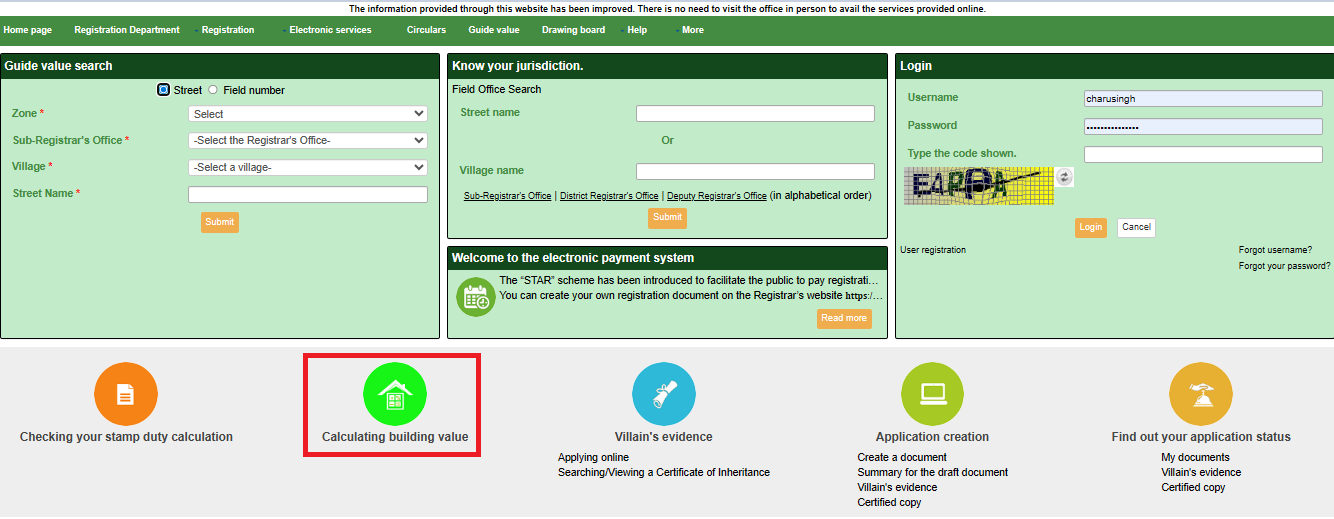
- Scroll to the footer and click on “CALCULATE BUILDING VALUE“, which appears with a green house logo
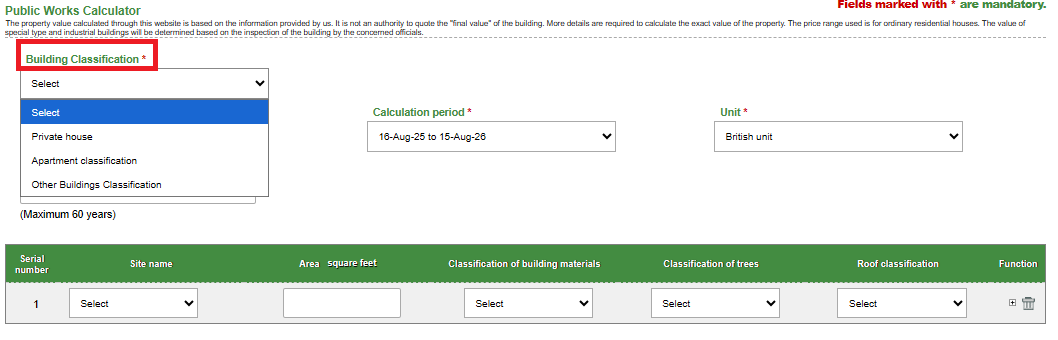
- Input Building Classification: From the first dropdown, select category:
- Residential/ Private house.
- Apartments classification.
- Other Buildings Classification.
- Select the “Calculation period” and “Unit“
Example: “Residential – RCC Framed Structure” for a typical 2BHK flat.
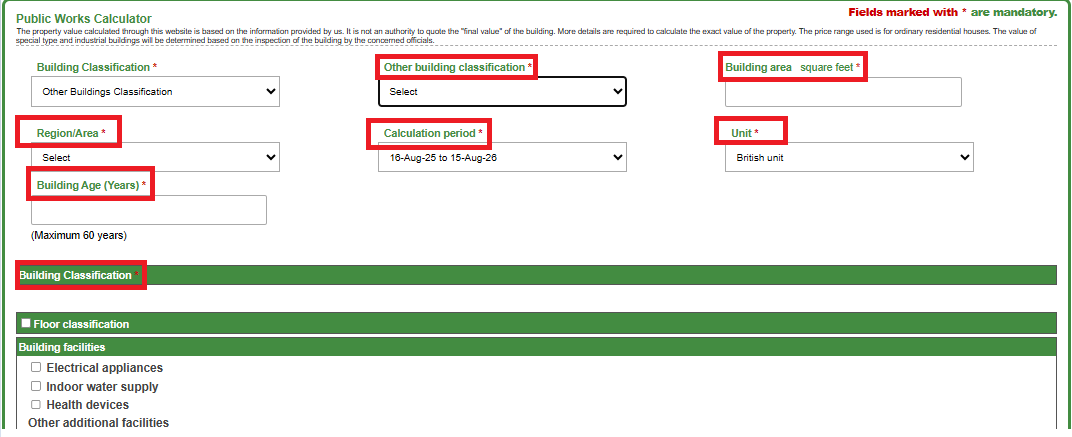
- Specify Building Type and Details:
- Property Type: Choose the type of property you have, such as an independent house, apartment, or factory shed.
- Property Age: Enter how old the building is in years, for example, 8 years. The system will automatically calculate depreciation based on age. For instance, buildings up to 10 years old may get about 2% depreciation per year. After 30 years, the value may reduce to around 60% of the original cost.
- Built-up Area: Enter the total built-up area of the property. You can enter the value in square feet (like 1200 sq.ft.) or square meters. The system will convert the unit automatically if needed.
- Number of Floors: Enter the number of floors, such as Ground + 2 floors (G+2). If the building has stilt parking, an extra premium of about 5% may be added.
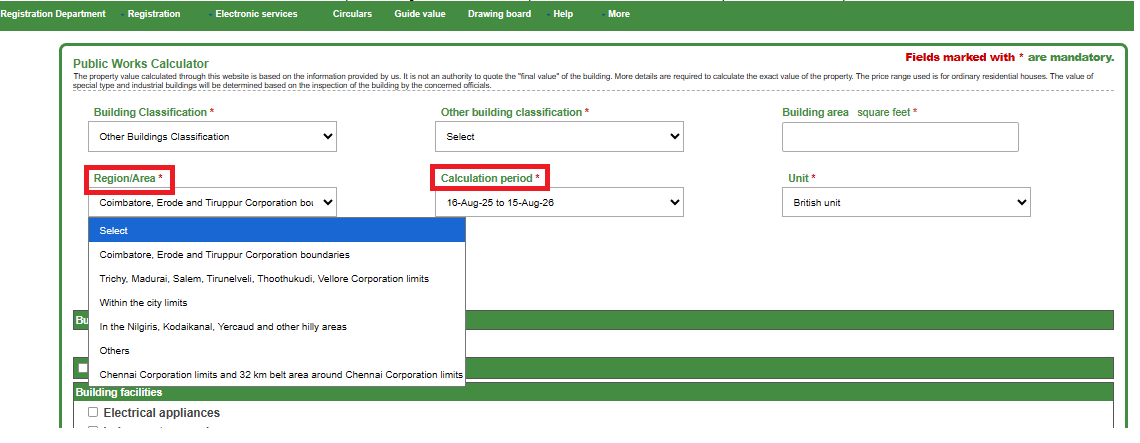
- Enter Zonal and Regional Parameters:
- Zone/Region: Cascading dropdown (e.g., Chennai > Central > T. Nagar), pulls live guideline (₹4,000/sq.ft. base for 2025).
- Street/Ward: Optional text for micro-adjustments (e.g., “Anna Salai” boosts 10% for commercial).
- Calculation Period: Default “Current” (Q4 2025 rates); historical for legacy audits.
- Advanced Options (Optional Features)
Depreciation Change: If a certified valuer suggests a different depreciation rate, you can enter it manually. For example, some special buildings like earthquake-resistant structures may use a lower rate such as 3%.
Extra Add-Ons:
If your building has extra facilities like lifts or air conditioning, you can add them. These may increase the value by around ₹500 per sq. ft. If solar panels are installed, you may get a small green rebate of about 2%.
Multi-Unit Buildings:
If you are calculating value for an apartment or building complex, you can enter the total area. The system will automatically show value details for each unit.
Check and Submit:
Before submitting, you can see a summary. For example:
Base Value: ₹3,800 per sq. ft × 1200 sq. ft = ₹45.6 lakh
Depreciation: –₹4.56 lakh
Final Value: ₹41.04 lakh
After checking, click submit. There is no captcha needed for this step.
Review and Download Results
Result Dashboard:
You will see a table showing full details like Base Value, Depreciation percentage, Add-On costs, and Final Building Value (example: ₹41,04,000).
Extra Cost Calculation:
The system also calculates stamp duty and registration fees automatically.
Example:
Stamp Duty (7%) = ₹2,87,280
Registration Fee (1%) = ₹41,040
Download Options:
You can download a PDF report with a QR code for SRO verification. You can also download an Excel file if you need it for bank or loan purposes. The report will stay saved in your browser for 365 days.
| Input | Example | Effect on Value |
|---|---|---|
| Building Type | Residential (RCC) | ₹3,000 – ₹5,000 per sq.ft (base rate) |
| Building Age | 5 years | 10% value reduction |
| Built-up Area | 1500 sq.ft | Value increases based on area |
| Location Zone | Madurai South | 8% higher value |
| Extra Facilities | Lift & Parking | Adds ₹7,50,000 |
Final Words
The TNREGINET portal is a useful tool for anyone dealing with property in Tamil Nadu. It makes building value calculation simple, fast, and reliable. By using this online system, property buyers and owners can plan better, avoid extra costs, and complete registration without confusion.
If you are planning to buy, sell, or register property, checking building value through TNREGINET is always a smart step.